
How Do I Add Alt Text to Images in WordPress?
Alt text (alternative text) is a short description that explains the content of an image. It helps search engines understand your images and improves accessibility for users who rely on screen readers. Adding alt text to your images is a simple way to boost your website’s SEO and make your content more inclusive.
- Log into your WordPress Admin Dashboard by going to yourwebsite.com/wp-admin.
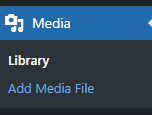
- Open the Media Library in the left hand menu.

- Select an image. An attachment details panel will appear with the image.
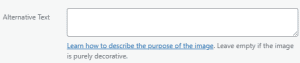
- On the right hand side of the Attachment Details panel will be an “Alternative Text” field.
- Type a short, descriptive phrase that explains what the image shows.
- After entering your alt text, simply click the X to close the panel. WordPress automatically saves your changes.
Was this helpful?
By voting, you consent to anonymous data collection to prevent duplicate votes. No personal information is stored.